
TenantSimplified Product Tour: A Simpler Way to Manage Rental Properties
Rental information rarely lives in one place for long. Property details sit in a spreadsheet. The rental agreement is a PDF in email. Payments show up in a bank statement. Documents live in a folder. Reminders sit in a chat thread. Each piece can be accurate on its own — and still hard to reconnect when you need the full picture.
As a portfolio grows, that disconnect becomes the real work: finding the right unit, the current tenant, the agreement amount, what was due, what was paid, and what is still outstanding. Rental property management software is useful when it keeps those pieces connected instead of asking you to rebuild the story every month.
TenantSimplified is rental management software designed for landlords and property managers who want everyday rental information — properties, tenants, agreements, rent, invoices, and payments — organised in one workspace.
Watch the TenantSimplified Product Tour
This product tour walks through the actual TenantSimplified interface and shows how rental information can be organised across the rental management workflow.
The sections below add context around what you see in the tour — so the page stays useful even if you read first and watch later.
Start With a Clear View of Your Rental Portfolio
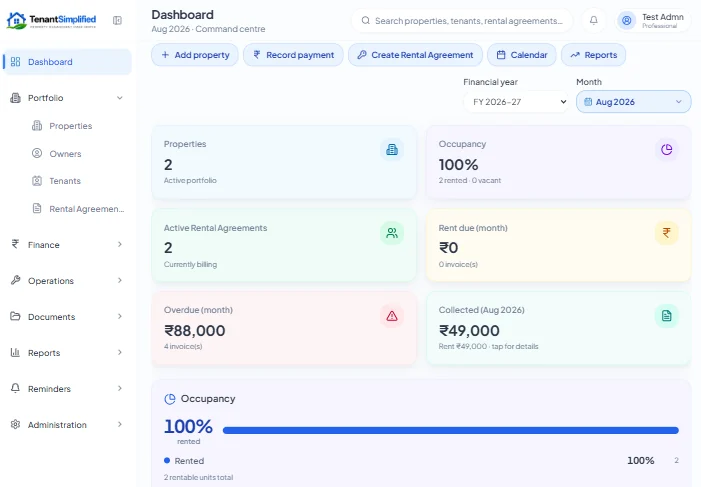
The tour opens on a dashboard that summarises the portfolio at a glance. Instead of opening several files to answer “where do things stand?”, you see the kinds of signals landlords check most often: properties, occupancy, active rental agreements, rent due, overdue, and collected.
That overview matters because rent problems rarely announce themselves early. A clear view of what is due versus what is overdue helps you decide where to look next — a specific property, a tenancy, or a payment that never got recorded. Occupancy and active agreements keep the operational picture attached to the financial one.
The dashboard is not meant to replace detailed records. It is a starting point: a connected summary that points into the underlying property, tenant, and rent records.
You can treat the dashboard as a daily checkpoint: scan overdue and due first, then open the property or tenancy that needs attention. That habit is harder when the same signals are split across a sheet, a bank app, and a chat search.
Manage Properties and Units in One Place
TenantSimplified organises rentals as properties with their units underneath. That sounds simple, but it is the structure everything else hangs on.
When rent, documents, or a tenancy are tied to the correct unit, you spend less time asking “which flat was this for?” A payment against the wrong unit creates a false outstanding balance somewhere else. A connected property and unit record reduces that mix-up by giving every later transaction a place to belong.
In practice, you set up the property once, add units, and then attach tenancies and rent activity to those units as they become active.
If you manage more than a few doors, consistent naming of properties and units also pays off later in filters and reports. The tour shows the portfolio structured that way so rent and tenancy records stay attachable as you grow.
Keep Owner Information Organised
Where the product shows owner management, owner details sit with the properties they relate to — rather than only in a separate contacts list you have to cross-check by hand.
That is useful when more than one person is involved in a property, or when you need to know who owns which building without digging through email. Owner records in TenantSimplified are there to keep ownership information organised alongside the portfolio — not as a full separate CRM product.
See Your Tenants at a Glance
Tenant management in TenantSimplified is about keeping tenant information attached to the rental workflow: who is in which unit, under which agreement, and how that ties to rent activity.
A tenant list is helpful. A tenant record that connects to the active agreement and rent dues is more helpful. You can move from “who is this person?” to “what is due for this tenancy?” without switching tools.
This is organisation for everyday rental operations — contact and tenancy context — not a claim of advanced sales-CRM features the product does not present as its focus.
Keep Rental Agreements and Terms Connected
Rental agreements set the terms that rent tracking depends on: who is responsible, which unit, what amount, and which dates matter. When the agreement lives only as a file, those terms get retyped into a sheet and slowly drift.
TenantSimplified keeps rental agreement information connected to the tenant and property records. Important tenancy terms stay next to the people and units they apply to, which makes renewals, rent changes, and month-end checks easier to explain.
This is operational clarity, not legal advice. The agreement record supports administration; it does not replace professional legal review when you need it.
Track Rent and Invoices
The product tour shows rent and invoice management in the same workspace as the tenancy — so “what is due,” “what is overdue,” and “what has been collected” are not three different files.
When dues and invoices are created against the right tenancy, you can see open items without rebuilding the month from a bank export. Overdue stands out because the due existed first. Collected makes sense because payments were applied to those dues.
If you want a deeper walkthrough of spreadsheet limits versus a connected trail, see How to Track Rent Payments Without Excel. For portfolio-scale organisation beyond a single sheet, see How to Manage Multiple Rental Properties Without Spreadsheets.
Rent and invoice management in TenantSimplified is built around that connected due — not around inventing a separate finance silo.
A useful month-end check is simple: every active tenancy should have an expected or invoiced amount for the period, and every payment should point at one of those open items. When that is true, collected and outstanding stop being estimates.
Record Payments Against Rental Transactions
Recording a payment is only half the job. The other half is attaching it to the correct rental transaction — the due or invoice it settles.
In the tour, payments are logged in context: amount and timing matter, but so does which open item they close. That association is what turns a bank credit into a clear rental record. Partial payments can leave a visible outstanding on the same due instead of disappearing into a note.
Without that link, you still have money in the account — and an open rent question you cannot close cleanly.
Follow Rent From Expected to Outstanding
TenantSimplified follows a simple path:
Expected → Invoiced → Paid → Outstanding
Expected rent is what the agreement implies for a period. Invoiced (or marked due) is the formal open item. Paid is what has been applied. Outstanding is whatever remains.
That sequence creates a clear financial trail. You can explain a month later what was supposed to come in, what was asked for, what arrived, and what is left — without reconstructing history from memory. That is rental operations clarity, not a substitute for accounting or tax software.
Why Connected Rental Information Matters
Having information is not the same as having connected information.
A useful chain looks like:
Property → Unit → Tenant → Rental Agreement → Rent → Invoice → Payment → Outstanding
When each step points to the next, you stop re-reconciling the same facts across spreadsheets, folders, and chats. Portfolio views and property management reports only help if the underlying links were recorded correctly in the first place.
Disconnected tools can still store data. Connected records reduce the hidden work of making that data agree.
That is the same idea behind the product tour: not more screens for their own sake, but fewer places where the same fact has to be typed twice.
Who Is TenantSimplified For?
TenantSimplified is for landlords and property managers who want a more organised way to run everyday rental operations — properties and units, tenants, agreements, rent, invoices, and payments — without keeping every detail in separate files.
If you are still early, a careful spreadsheet can work. When the portfolio or the number of people updating records grows, a connected workspace becomes the calmer option.
It is also a fit when more than one person updates records. Shared spreadsheets drift when two people edit different copies; a single workspace keeps the same property, tenant, and rent trail visible to everyone involved.
Try TenantSimplified
TenantSimplified is available as a Free Beta.
Rental Management, Simplified.
Manage your properties, tenants, rental agreements, rent, invoices, payments and other rental information in one organised platform.
Be part of the Free Beta
Watch the tour above, then try the workflow on your own rentals when you are ready. No need to change your whole process on day one — start by keeping property, tenant, agreement, and rent records in the same place.